Realtime Clinical
Documentation
Designing the interface for AI native clinical documentation, before AI was a thing. A realtime clinical AI platform that listens to provider and patient conversations and gives realtime insights and reports as they happen.
Designing for AI native documentation
I built the design for the entire platform, designed the core modules, and led the design team to expand on them. The platform listens to provider and patient conversations and produces realtime insights and reports as they happen.
It is a natural evolution of an AI transcription platform I designed with the CEO before, reusing its speech recognition, NLP and inference engines.
A doctor should be able to look at their patient, not a screen.
Manual clinical documentation steals time from providers and nurses. They spend extended hours completing documentation and less time on patient care and conversation.
The Problem: Manual documentation and EHRs pull providers away from the patient. Hours go into paperwork instead of care and conversation.
The Vision: Move beyond manual clinical documentation and EHRs to a platform that transforms the healthcare workflow with AI.
The Precursor: A natural evolution of an AI transcription platform I designed before, NLP, and inference engines.
Reduce documentation by managing the data across the whole visit.
Documentation cannot be fixed with one screen. It has to be handled across the journey, from the moment a patient checks in until the report is done. The complete flow included 1000+ screens, for every user and every edge case.
A birds eye view: the flow starts by capturing the provider and patient conversation and streaming it to speech recognition that transcribes it in realtime. A conversational AI assistant interacts with the provider directly, while an NLP engine extracts the context and generates reports automatically, with a complete human in the loop workflow for fixing lower confidence results.
Patient Intake: So the data is right from the start.
The Companion App: So the provider documents nothing by hand.
The AI Trainer: So the assistant can take real clinical actions.
Patient Intake
Fix the data at the source, before the visit even starts.
Physical intake forms are long and complex. Patients are expected to fill in a lot of fields, full of medical terms they cannot read or understand. So they end up needing a nurse to fill it in for them, or worse, enter incorrect information.
The design has to work on any device, in any language, and support patients who cannot fill the form by themselves.
I show one question at a time. This single design decision had a cascading effect. Only the questions relevant to the patient are shown, the conditions resolve dynamically as they answer, and help adapts to each question and stays within reach. One answer can hide or reveal many others. Smoking cessation questions appear only for a patient who is both a minor and a smoker, so no one else ever sees them.
Companion App, the core
The provider talks to the patient, not a screen.
The provider spends most of the day on data entry and ends up with very little time for the patient conversation. The patient does not get their questions answered and feels neglected.
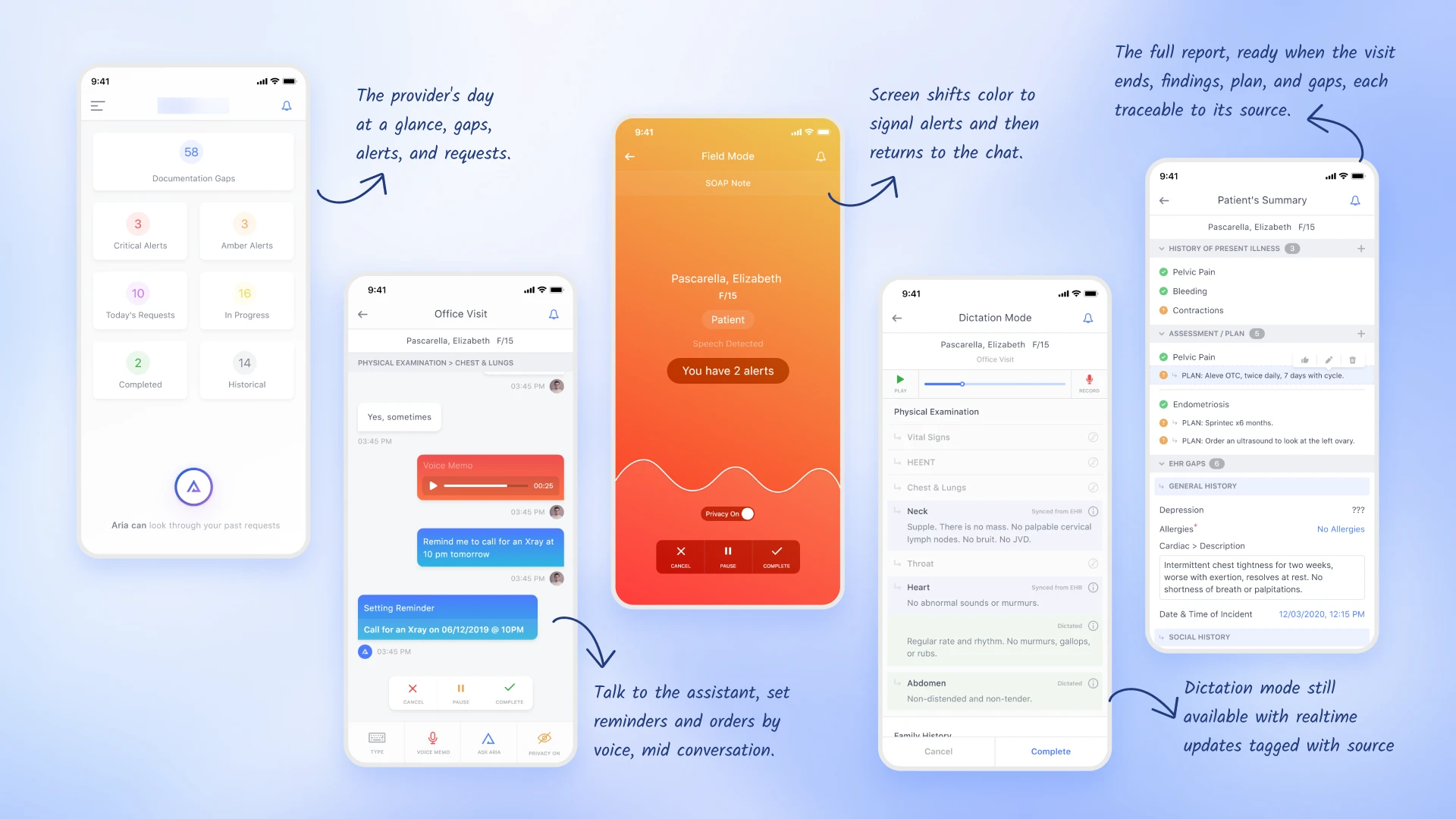
AI produces a lot of insight. The challenge was to organize and disclose it progressively, without interrupting the conversation, while still letting the assistant take requests.
I proposed a realtime chat interface. The screen glows in a color when the AI has something to say, and requests like a lab order or a reminder appear as color coded bubbles, so a single glance confirms they registered. If a detail is missing, the provider can check the EHR or the live summary and confirm it with the patient on the spot, instead of dictating an addendum later.
AI Assistant Trainer
Teaching the assistant to take real clinical actions.
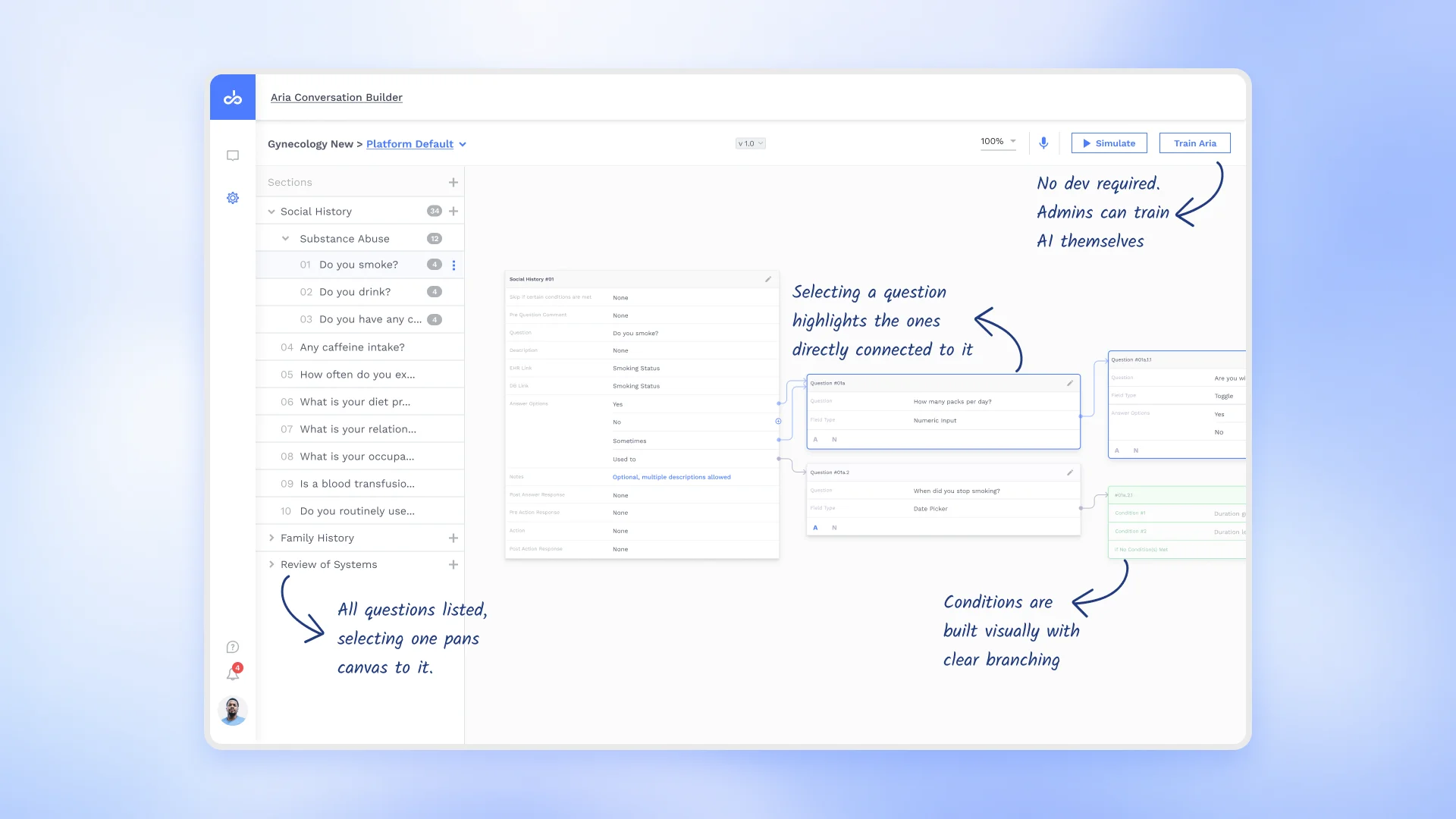
These workflows hold a lot of questions. Showing them all at once results in endless scrolling, and conditional questions get hidden.
Let a non engineer build a complex flow with clinical logic and still see the whole flow, without it collapsing into a list no one can follow.
I proposed a node based canvas. Questions are laid out spatially and linked to the answers that lead to them, so the logic is something you can see, not scroll through.
An early view of AI inside a clinical product
Designing this gave me a rare, early view of how AI can live inside a clinical product, and that is what I bring to healthcare design now.
Design for the last user
I learned how a permission set at the top reaches all the way down to the last person who uses it, the nurse, the patient. Now I start with that whole flow in mind before I design a screen.
Build to ship
An idea only matters if it can be built. The auto arranging canvas worked only because I designed it together with the developers. Now I bring engineering in early, while the idea is still forming.
Edge cases first
The happy path is the easy part. The real design is in the dropped connection, or the patient who says no to AI. Now I look for what breaks the flow, not what makes it.
How AI works behind the scenes
I designed the training modules, an inference engine, a realtime assistant, and more. That gave me a real sense of how AI lives and works inside a product.
AI can be on every screen, but the human should be the decision maker.
This is one belief that formed the base of all my designs. I learned how a permission set at the top reaches all the way down to the last person who uses it, the nurse, the patient.
The happy path is the easy part. The real design is in the dropped connection, or the patient who says no to AI. Now I look for what breaks the flow, not what makes it.