Cutting template creation from days → hours
Reframing a document generation workflow to remove a 2 to 3 day engineering bottleneck.
Days of engineering behind every document
Organizations on the platform use forms to collect student data and generate official form outputs. Each output used a PDF template built from the form fields, which was uploaded to the system. User responses got filled into it automatically when they submitted a form.
But the workflow behind it required an engineer to recreate the form layout in external PDF tools and do the data mapping manually into the template, resulting in multiple validation cycles and back and forth before the template reached production.
This case study presents my design process behind creating a modern output builder that reduced template creation time from days to hours.
Deconstructing the problem space and execution scope
Most of the work went into understanding the legacy workflow and designing the builder around what the system and the teams could support. This case study covers the output builder, one module of a form ecosystem I designed end to end.
Observation
- Workflow mapping
- Legacy screen audit
- Template and code teardown
- Engineer walkthroughs
- Implementation team interview
Analysis
- Response code counting
- Obsolete feature tracing
- Feature carry over decisions
- Problem reframing
Validation
- Cross client template review
- Technical feasibility check
- PoC with engineering
- Stakeholder review
Implementation
- Design system reuse
- Builder interaction design
- Preset and constraint scoping
- Handoff specs
Learning the work from the people who did it
Before I designed anything, I spent time researching how this work was actually done. I mapped the full workflow across users, admins, engineers, and the system dependencies between them, to understand where effort was actually going and who was affected by it the most. I audited the legacy output setup screen by screen, and opened existing templates and their response code exports to see exactly how a finished output was wired.
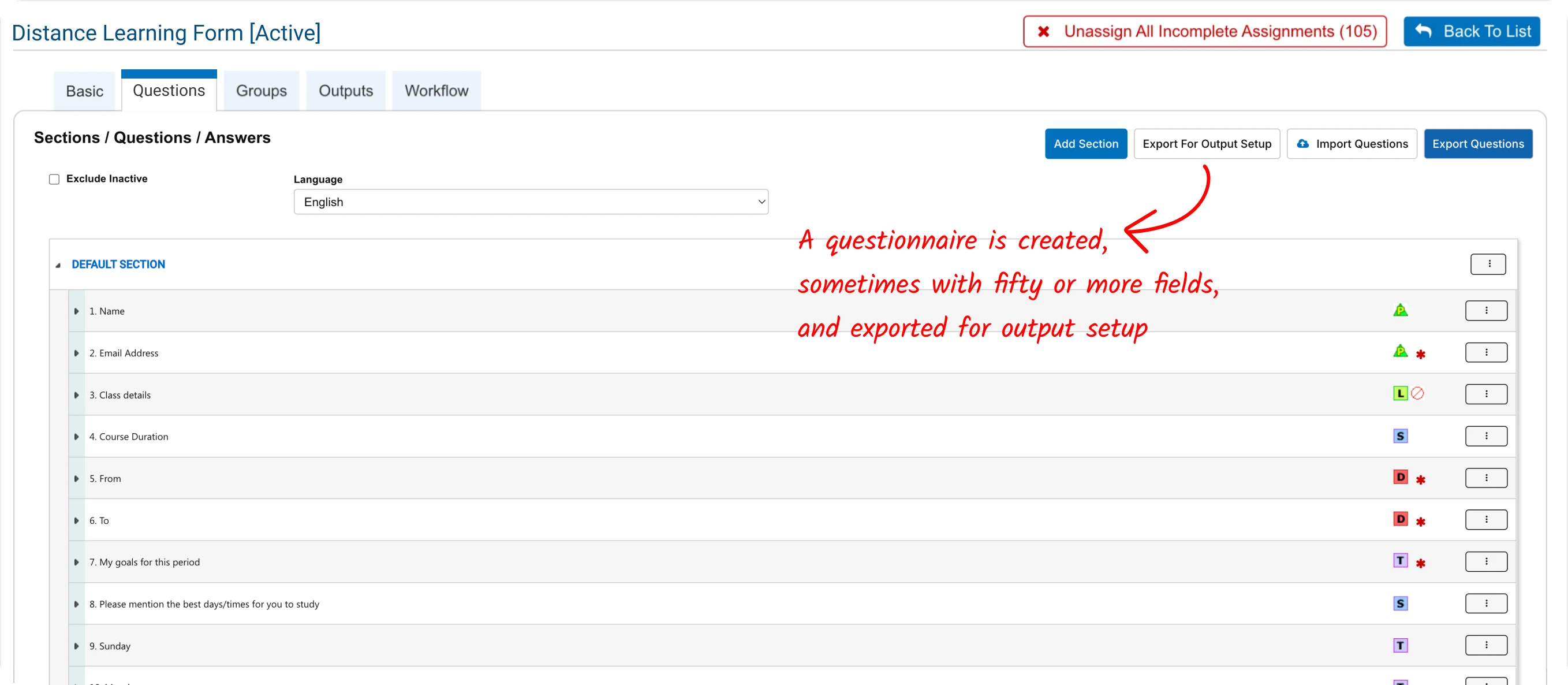
A questionnaire is created, sometimes with fifty or more fields, and exported for output setup.
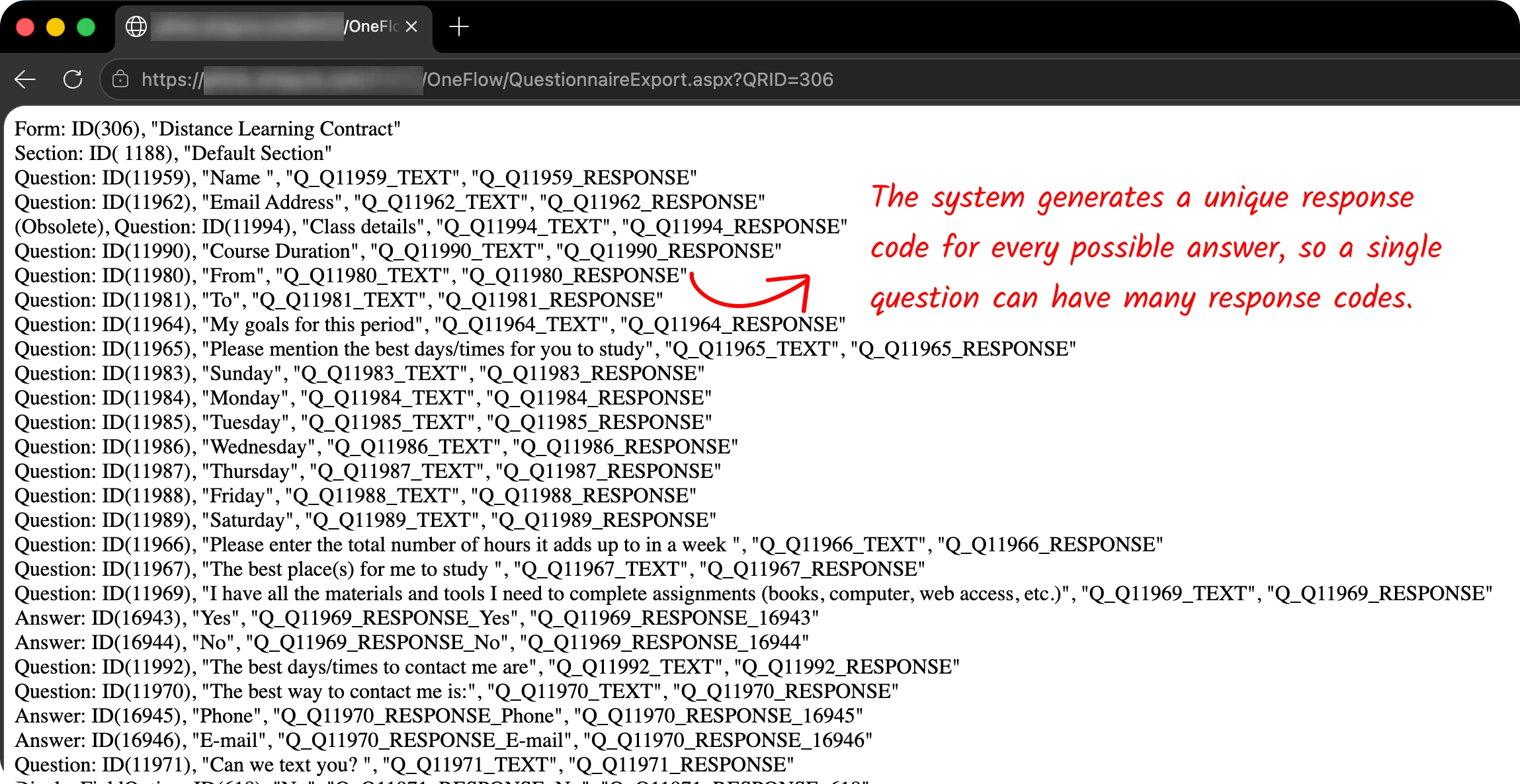
The system generates a unique response code for every possible answer, so a single question can have many response codes.
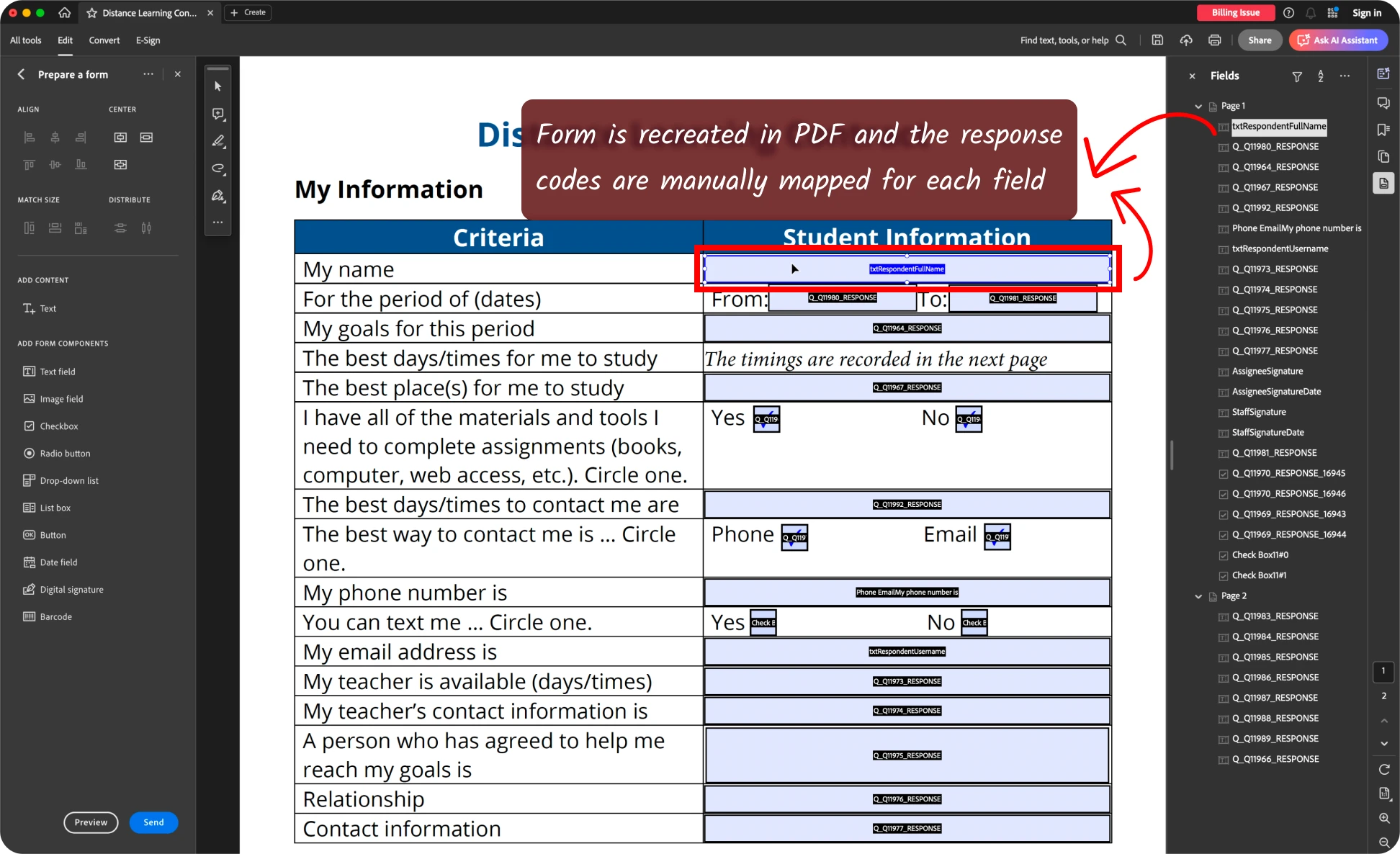
Required fields are recreated in PDF and the response codes are manually mapped for each.
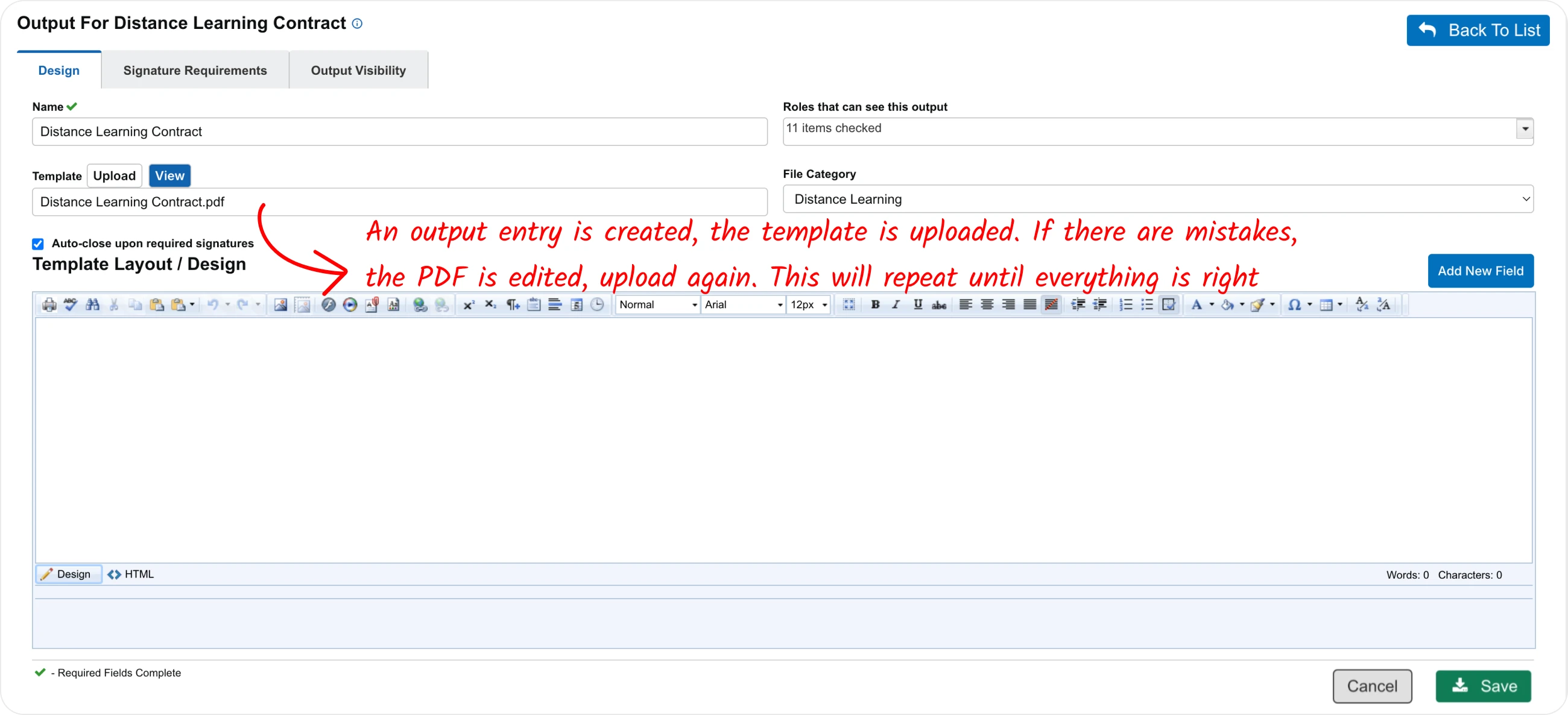
An output entry is created, the template is uploaded. If there are mistakes, the PDF is edited, upload again. This will repeat until everything is right.
Showing step 1 of 4
The people building these templates were the engineers themselves. So rather than running a formal study with unfamiliar participants, I worked alongside the people who lived inside this workflow every day.
I interviewed the implementation team manager whose team built these outputs, to understand what they needed from a better tool. Then I had the engineers walk me through building a form and mapping its codes, step by step, the way they did it on a normal day. This gave me a clear picture of what should carry over to the new builder and what could be dropped.
Where effort was actually being spent
I found that most of the time was going into mapping the response codes into the template rather than designing it.
Every answer carried its own response code. The example form below was one of the most common, and it had twenty three questions, but forty five codes to map. Every form requires at least one output with all the fields mapped by default, and larger forms ended up requiring hundreds of mappings per form.
Missing or mistyping a single code meant the field would not get filled, or worse, wrong information would be filled in on an official document.
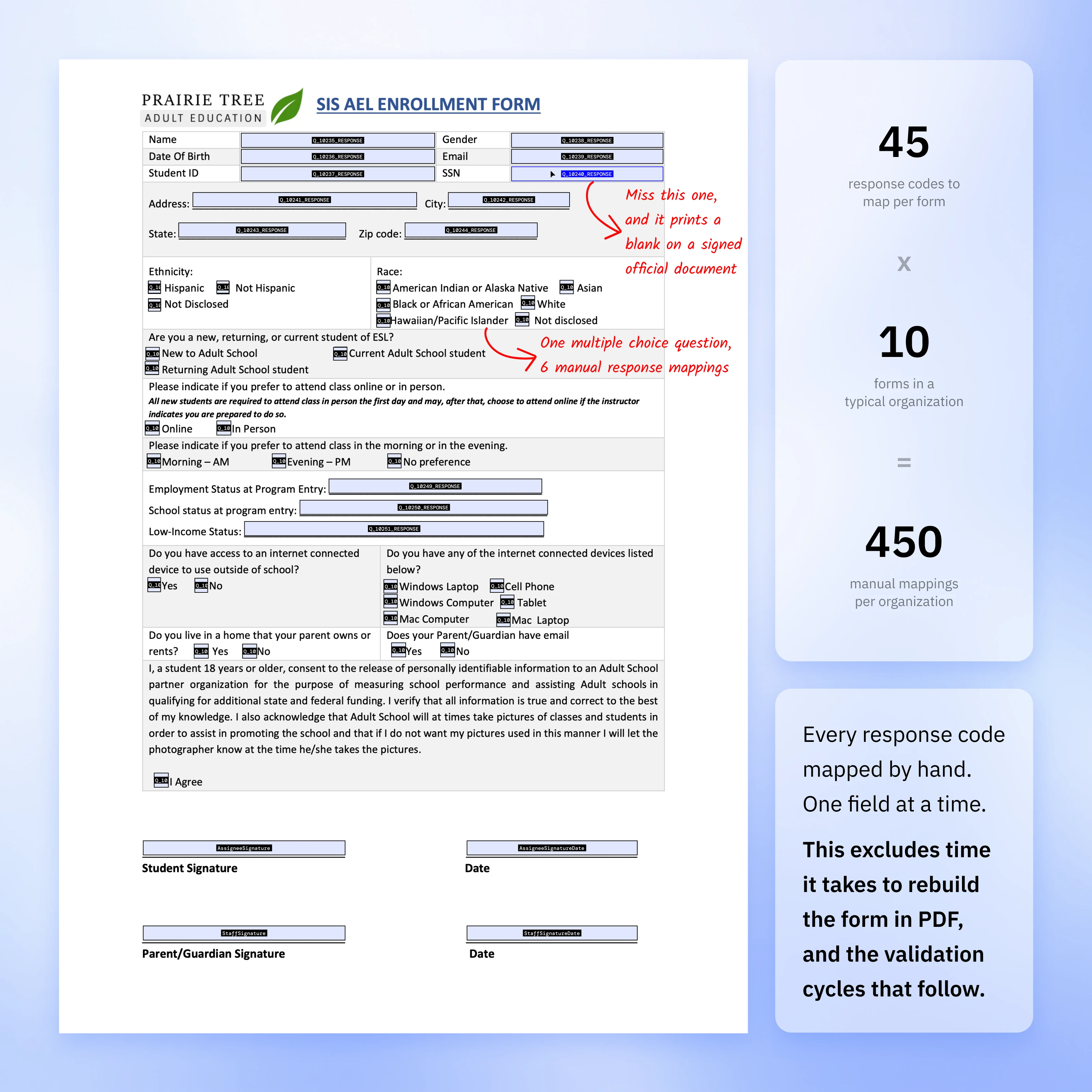
The audit also turned up things nobody remembered the reason for. One option, File Category, had been added for a single client and carried through every build since, though no one used it and no one could explain what it did. When I traced it, it turned out to organize the generated PDFs inside the system. Since the new model does not store PDFs at all, the option had no reason to exist, and it was dropped.
From building a PDF editor to redesigning the workflow
The original requirement was simple:
“How might we make PDF creation easier?”
But once I realised that it was the manual mapping that was taking up the engineer's time, I rephrased the requirement:
“How might we remove manual mapping, so the engineers just build the layout?”
This reframing simplified the scope from building a brand new PDF editor inside the platform to a workflow redesign. By removing unnecessary steps, we would make the complex manual workflow simple. The challenge was to build it without affecting the legacy backend, and to build on the mental models users already understood.
Automating the mapping model before the interface
There are two parts to the output builder: a mapping layer and the layout builder. PDF was the container which had both of these layers packed together.
If layout is built into the system, why keep PDF as the container at all? Can't the mapping data be stored separately as data bindings? I had worked on similar mapping systems before and immediately thought of JSON as a viable alternative.
That was my theory, so I went and checked it. I reviewed the output templates built for several clients over the period and found that the design of them all followed a simple layout pattern, repetitive enough for the system to generate, while the response code changed for every single response. So, keeping the template builder decoupled from the codes will be more efficient.
- ✕Large binary files, not machine-readable
- ✕Every version duplicated as a separate file
- ✕Mapping locked to the static asset
{
  "Q_10235_RESPONSE": "name",
  "Q_10238_RESPONSE": "gender",
  "Q_10240_RESPONSE": "ssn"
}- ✓Compact, machine-readable JSON schema
- ✓No stored template assets to version
- ✓Mapping maintained independent of layout
I took this idea to the react team and they did a PoC based on my request and made my theory a reality. It was faster and more efficient than creating a PDF document. So we decided to adopt it. The template became a structure that the system fills on demand, which required no server side changes to the legacy backend.
Going Wide on Purpose
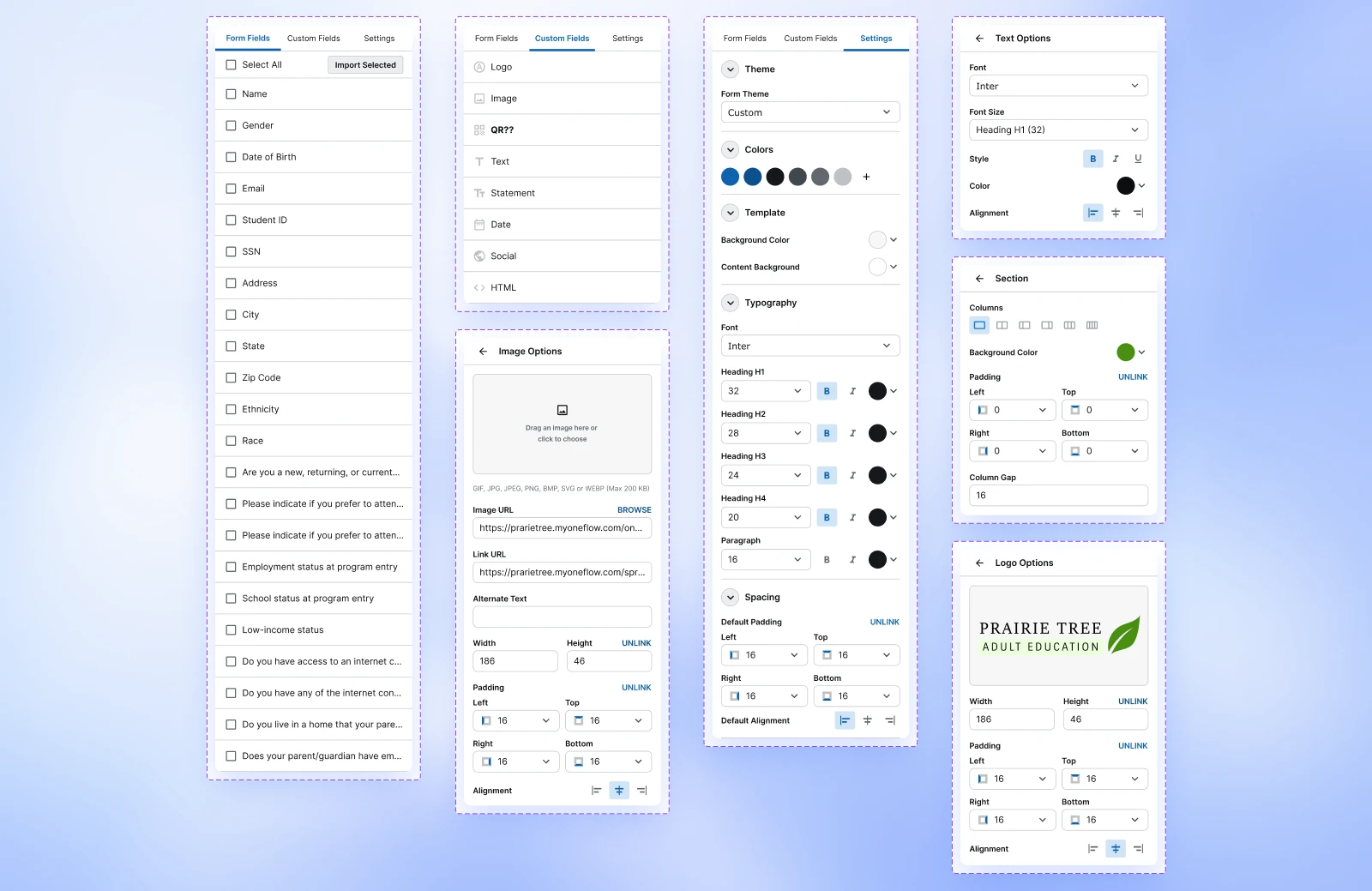
For the builder I wanted to build on the mental models users already understand. Like the modern form builders like Google Forms and Microsoft Forms, only change is that instead of dragging fields, users drag questions.
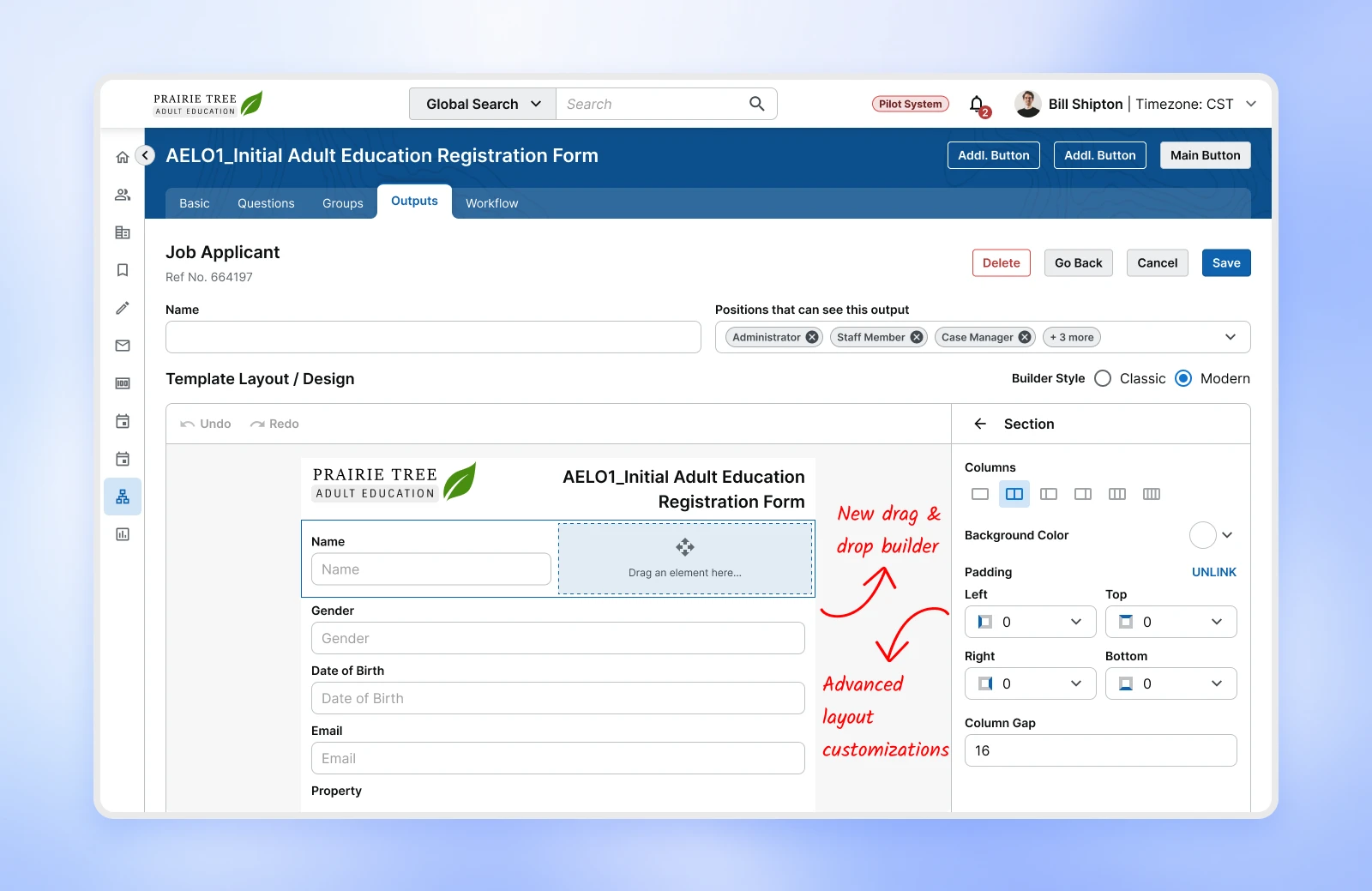
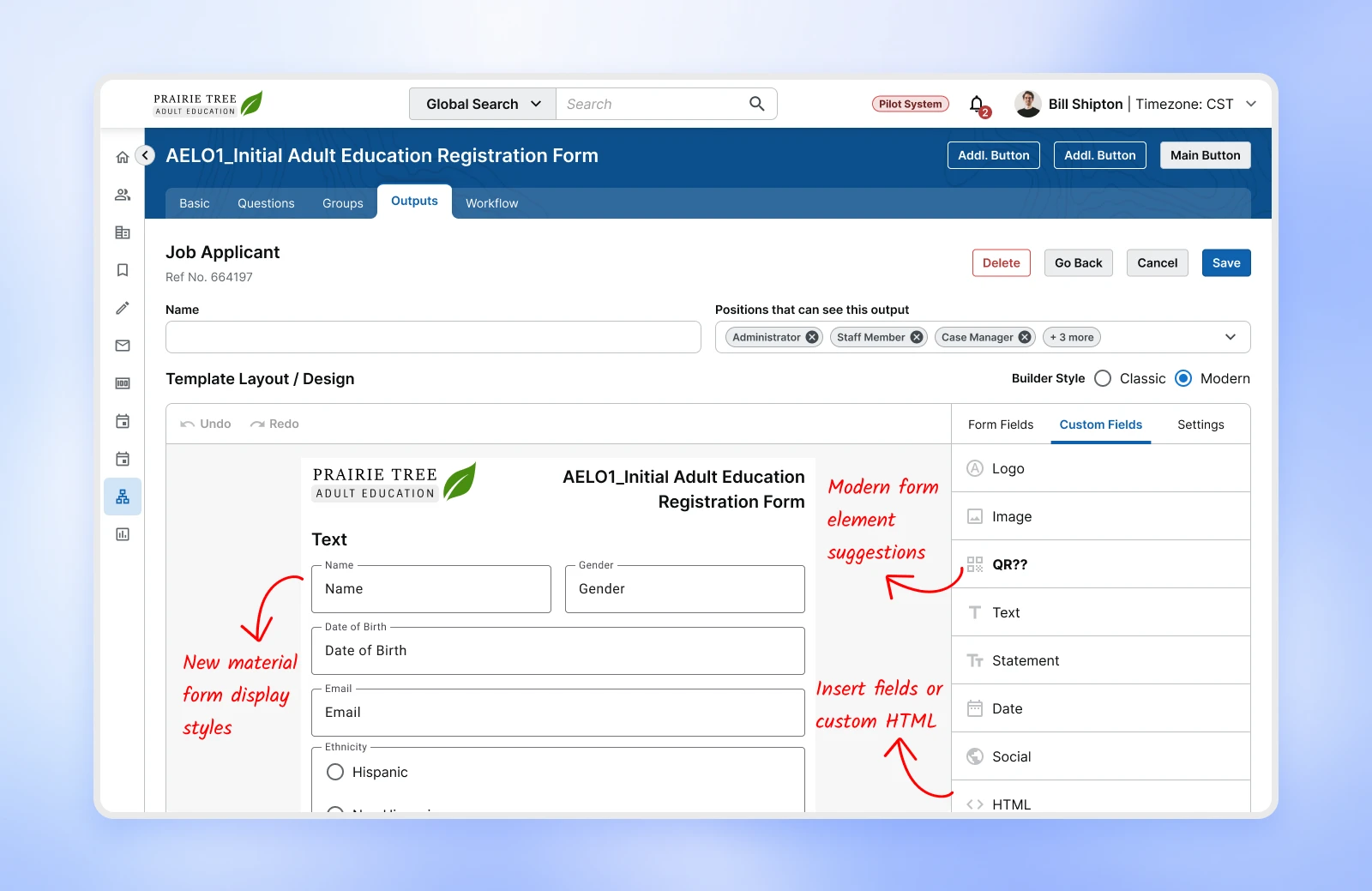
To make this work seamlessly, I used existing react functionalities that I already designed for a customizable staff dashboard. It was already built and running. So, I took the core idea of drag and drop and column layout systems, added more on top and designed the first version to purposefully go wide. I wanted to make it customisable enough for advanced users while still allowing non technical users to build layouts without customisation.
The point was to build a concrete foundation for the people to react to. It was how I turned a vague brief into a real conversation about what the product should and should not do.
What each team
was worried about
Once stakeholders saw the initial designs, the concerns and suggestions came in fast. Each one pointed at something in the exploration that was too open, too risky, or too costly to maintain. Some decisions were made and some open ended questions were left for my decision.
“The drag & drop will confuse the admins. Not everyone using this will be technical.”
I kept a manual way to add fields along with drag and drop. The visual builder became the default while the PDF route was still retained.
“An open ended layout builder will be painful to build and worse to maintain”
I narrowed the customization to a small set of choices that still covered the variation organizations needed.
“The new response mapping will be a challenge to implement”
I worked with the frontend engineers to confirm the mapping could be handled entirely on the frontend, with little to no extra backend work.
“Customers keep asking why implementation takes so long. They will love this!”
The people closest to the customer already knew it was worth fixing.
From manual workflows
to a visual system
Automated code mapping
Users select form questions from a list using an interface that focused on what they are trying to do, not how the system is doing it. The system handles response codes automatically in the backend.
- Less cognitive load
- No memorisation of codes
- Fewer mapping errors
- Easier for new users to pick up
Picking form questions from a plain-language list; the matching response codes are wired up automatically in the background, never shown to the user.
Visual builder
Template creation is now moved entirely inside the product. A visual builder without the bloated functions of a PDF tool is built within the product.
- Users can now see the output as they build
- No need to switch between the app and PDF tools
- Instant updates
Dragging fields onto the canvas and watching the output update live as the template is built, all inside the product.
Flexible Customizations
Users can now adjust layouts and styling easily. Enough control to handle real variation without adding a new learning curve. System handles the column presentation by itself.
- Simple yet flexible customisation
- The system decides the layout, so users do not have to
- No need for external PDF tools
Adjusting layout and styling from a small set of controls; the system re-flows the columns on its own.
Smart Organizational Defaults
Most organizations were rebuilding output templates with similar headers and layouts from scratch every time. Predefined org defaults allows users to start from a default template and only work with the form fields.
- Faster setup
- Reduces repetitive work
- Ensures consistency
- Better control for organizations
Starting from a saved organization default and filling in only the form fields, instead of rebuilding headers and layout each time.
A Faster Workflow,
and a Door It Opened
The clearest win was speed. Time to create a template reduced from multiple days to a few hours, even for the engineers who already knew the old process. Onboarding new organizations got faster, and customer requirements could be turned around more quickly instead of joining a long queue.
The quieter win was what it opened up. With the mapping gone, building a template no longer demanded engineering knowledge, only an understanding of the form. Engineers still run the builder today, but the work is no longer locked to them. The natural next step is handing it to the organizations directly, so they can update their own outputs without waiting on anyone.
2 to 3 days of dedicated engineer time per template, external software, and a manual mapping for every field.
Less than an hour, entirely inside the product, with no external tools and no manual mapping.
Exploring a More Radical Idea
During discovery, I proposed a larger improvement that could make the entire process even more seamless. The current workflow still treated forms as the source of truth. But most of the information users were collecting already existed somewhere in the platform.
"What if we design the output first and let the system determine what information is actually missing?"
This was out of scope for this release as it required rewriting core system logic. But it shaped how we started thinking about where the platform could go.
The ask was to make PDF creation easier. The real opportunity was understanding why it was hard in the first place. Once I mapped the workflow and found the hidden dependencies, I could remove a major part of the workflow rather than just making it less annoying.
The result was more than a better interface. It was a simpler system.